Tools · Template
CV template for AI training jobs
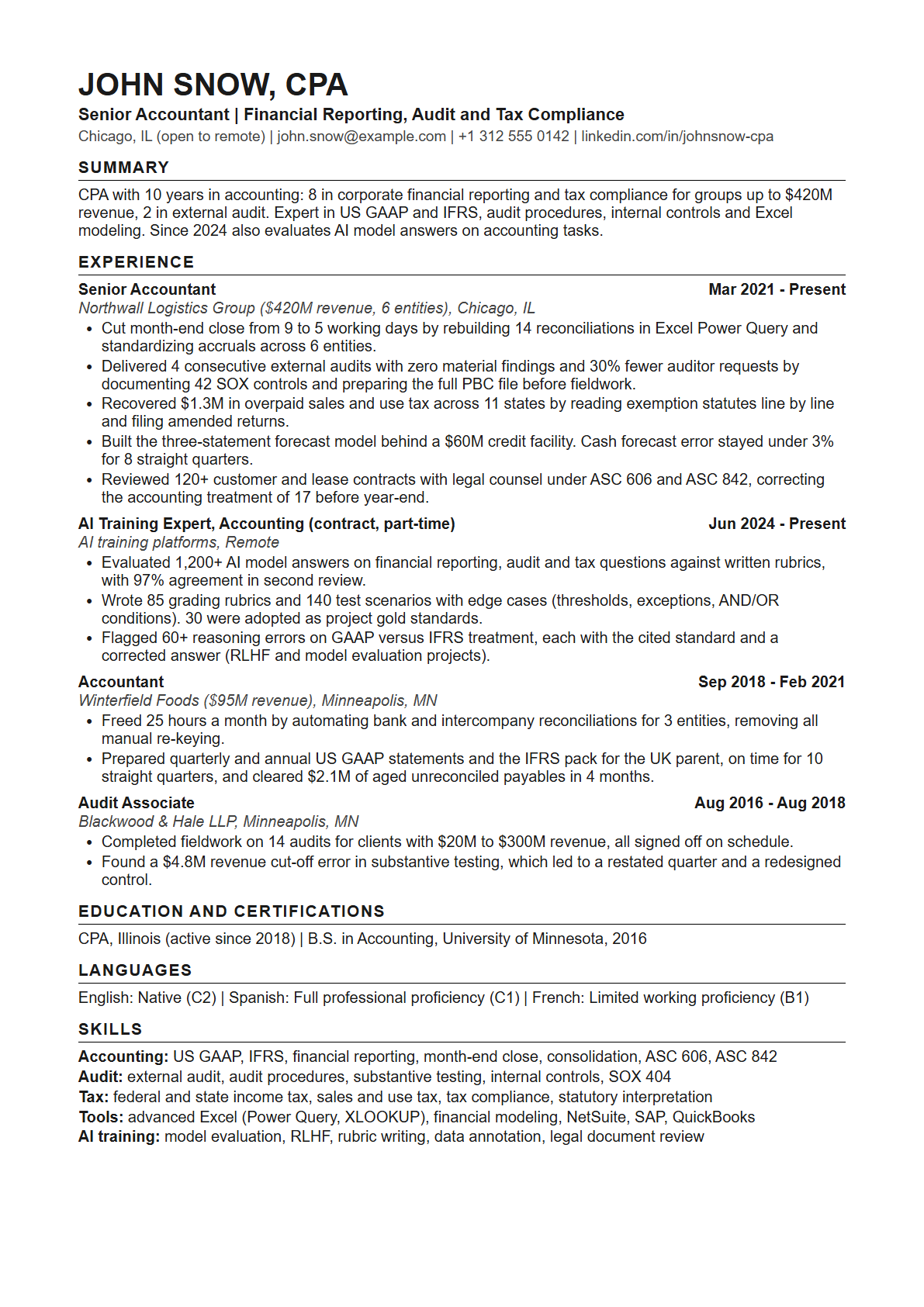
Most CV templates spend a third of the page on education and decoration. AI training platforms screen with software first and a person second, and both want the same thing: what you have done, in numbers, in the platform's own words. This template is built for that. It is free, and it is a Word file, which opens in Word, Google Docs, Pages and LibreOffice.
Get the template
Your first name and an email address, and it is yours on this screen straight away.
Next step
Match it to each job with AI
The template gives you the layout. This prompt fills it in for one job at a time, from your real experience. It works in ChatGPT, Claude and Gemini, free versions included. I built it from the way I tailor my own CVs: the AI asks about the experience you left out before it writes anything.
- Copy the prompt.
- Open ChatGPT, Claude or Gemini. Paste the prompt, attach your CV, and add the job link, or better, the job text.
- Answer its questions. It asks about results and examples your CV leaves out. That is the step that made my own CVs better.
- Paste the result into the template. Check that every line is true and that you can talk about it, because an AI interview usually comes next.
See the prompt
Applying to a role listed on AIPayList? The page of every open role with its full posting has its own copy of this prompt, with the posting already inside. Browse open roles
How the template is built, and why
1. A summary of three lines at most
Start with your years of experience, then what you do, then where you are an expert. A screener decides in seconds whether to read on, and a paragraph of adjectives tells it nothing.
2. Experience first, and results, not duties
Every bullet says what changed because of you, with a number: days saved, money recovered, error rate, volume handled. Then how you did it. "Responsible for month-end close" describes a job. "Cut month-end close from 9 to 5 days" describes you.
3. Education in one line
Degree, school, year, and any licence that the role names. Platforms pay for what you can do now, so the space goes to experience.
4. Languages with a level, in both scales
Many AI training roles are language work. Write each language once with the level in words and the European letter grade, for example "Spanish: Full professional proficiency (C1)". Recruiters in the United States read the words, recruiters in Europe read the grade.
5. A keyword block that repeats the job post
Four or five short lines of skills, grouped by area. Use the exact words of the role you are applying to wherever they are true for you. This is what an AI screener and a search inside the platform match on.
6. One page, one column, nothing drawn
No photo, no icons, no tables, no text boxes, no second column. Software reads a CV top to bottom as plain text, and anything clever in the layout arrives scrambled.
About the sample
The template comes filled in, because a blank page with headings teaches nothing. The sample is a senior accountant, written against an accounting expert role that micro1 listed in September 2026. That role named five skills: financial reporting, audit procedures, financial modeling, tax compliance and legal document review. The five bullets of the current job answer those five, one each. Do the same with the role you want: read what it names, and let your strongest true result answer each one. Finance and accounting roles that are open now are on the finance experts page.
The sample also has a block for earlier AI training work. If you have none, delete it. Many expert roles say no AI experience is needed, and an empty claim is worse than no claim.
After the CV
On Mercor and micro1 the next step is an AI interview about your experience, so write nothing you cannot talk about for five minutes. What happens after you apply is the first hand account, and the tools page links Mercor's own page for its free practice interview.